Ad creatives
Adult Ad Creatives: What Gets Clicks and What Gets Rejected
Specific, honest creatives that match a clean landing page get the clicks and pass moderation. Rejections come from refused topics, broken links and flagged destinations, not from how explicit an ad is on a network that allows explicit material. Low click-through comes from vague copy that gives nobody a reason to tap.
Creatives matter more in adult buying than most people expect. Google Ads and Meta keep adult content out of their ads, which keeps the biggest brand budgets out of adult auctions. Your competition is other media buyers with similar targeting and similar offers. The creative is usually where two near-identical campaigns stop being identical.
What Moderation Allows and Rejects
Explicit material is allowed on AdsCompass, and so is iGaming. Violence, weapons and drugs are refused in every format. A standard creative clears review in about ten minutes, while edge cases take longer.
Why creatives get rejected
Three causes explain most rejections, and only one of them is about what the ad shows:
- Terms breach. The creative or the offer touches a refused category or breaks another advertiser rule. Read the terms once before the first upload.
- Incorrect link. A typo in the domain, a stray space or a tracking URL pasted without its parameters. Open the exact URL from the form in a private window before you submit.
- Flagged destination. The destination URL carries many VirusTotal alerts. Recycled redirect domains can arrive with someone else's history, so scan yours before building a campaign around it.
Read the rejection reason before touching the design. A creative refused for a broken link comes back refused again no matter how good the new headline is. If the reason is unclear, ask your personal manager or the Telegram support chat, which runs around the clock in English and Russian.
What Each Format Needs From a Creative
Push needs four assets, native needs two, and popunder needs none, because on popunder the landing page is the creative.
| Format | Creative elements | What the creative has to do |
|---|---|---|
| Push | Title, text, icon, image | Stay worth tapping for repeat subscribers |
| Native | Thumbnail, headline | Fit the page and pull a warm click |
| Banner | Static image | Get recognized at a glance |
| Video pre-roll | Short clip | Make the point before the content starts |
| Popunder | The landing page | Explain the offer on the first screen |
Take exact sizes and character limits from the upload form in the dashboard. Specs change over time, and the form is the version that applies today.
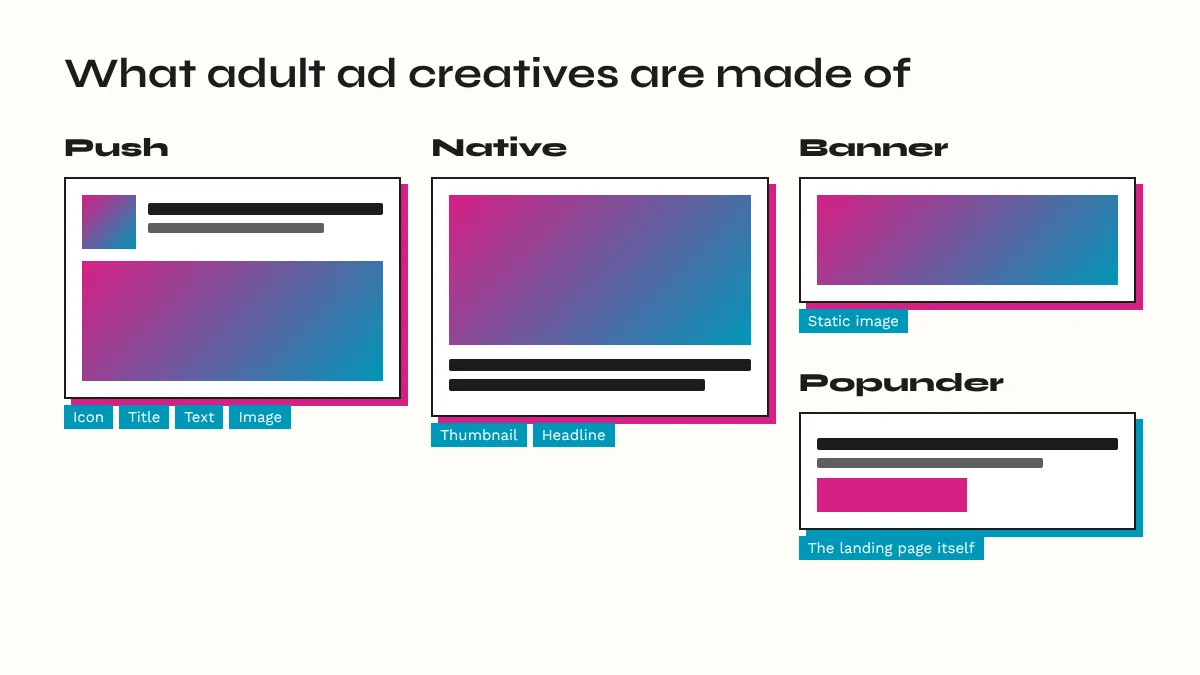
Match the promise to the format. Native earns warm clicks from in-content placements, which is why it suits multi-step signups and paid membership. Banner fits retargeting slots and known brands, so a banner for an unknown offer has to do all its work in one image. Pre-roll catches attention before tube content and suits premium offers that justify the interruption.
Popunder: the landing page is the creative
The landing page carries everything on popunder. The visitor did not choose to open it, so the first screen has to say what the offer is and what to do next, and it has to load before the tab closes. That is why popunder fits one-click flows and SOI offers. Test pre-landers here the way you would test images elsewhere.
Writing Push and Native Copy
Specific titles beat clever ones. A title that names something concrete, like a feature, a billing model or a time limit, gives a reason to tap. A pun gives a reason to smile and keep scrolling.
- Match the landing page. If the title says "free trial", the first screen says it too.
- Give title and text different jobs. The title hooks, the text adds proof or the action; repeating the title wastes the second line.
- Design the icon for small sizes. A face, a logo or one clear shape survives; fine detail turns to noise.
- Write in the target language. AdsCompass targets by browser language, so build one creative per language.
- Skip fake system alerts and fake unread badges. They buy clicks from people who feel tricked, and those people rarely pay.
Native headlines should read like content, not like a banner with words on it. The thumbnail stops the scroll, the headline makes the case, and the page keeps the promise. A headline that oversells wins the click and loses the signup on step two.
Keep a Safe Creative Approved and Idle
Upload a conservative backup with every campaign, get it approved, and leave it paused. If the main creative stops serving, or you decide mid-day it is too risky, the backup goes live with one click instead of another trip through moderation. The aggressive creatives you count on are exactly the ones most likely to be slow edge cases.
Conservative means boring on purpose: the brand name, a neutral title, a suggestive rather than explicit image. It will rarely win on click-through. Its job is to keep the campaign serving while you fix the main one. Keep a second clean destination domain behind it too, since a flagged domain hits every creative pointing at it.
Spotting Creative Fatigue
Falling click-through rate on an unchanged campaign is the main signal. Same bid, same targeting, same sources, and CTR slides week over week: the audience has seen the creative enough.
Pass the creative ID macro into your tracker so every click and conversion is tied to the creative behind it. Keitaro, Binom, Voluum and RedTrack connect to AdsCompass through S2S postback templates, and CPV Lab and CPV One have step-by-step integration guides. Without creative ID in your reports, fatigue looks like a bad week for the whole campaign.
Cross creative ID with the source ID macro before calling it fatigue. A CTR drop can come from a new source entering the mix. The reverse also happens: a creative can be worn out on the few sources sending most of your volume while it still works elsewhere.
Push tires first. It is built on repeat contact with the same subscribers, so the same people see your icon again and again. Frequency capping per unique IP per day slows fatigue on every format but does not stop it.
Rotate before the creative is dead. Keep the next variant approved, start it when the trend bends, and retire the old one when the new one beats it on conversions, not just clicks.
Testing Creatives Without Wasting Budget
Change one variable per test. If a new push creative has a different icon, title and image, a win tells you nothing about which change worked. My order:
- Image or thumbnail first, because it stops the eye.
- Title or headline next.
- Body text last, where the format has one.
- Landing page as its own test, never alongside a creative change.
Hold everything else still: same bid, same targeting, same sources, and even 24-hour spend rather than fast spend, so one variant does not get all the morning traffic.
Set the stopping point before launch. If each variant gets 1,000 clicks before judging, four variants commit 4,000 clicks before a single decision. Judge on conversions or revenue per click, because a title that doubles CTR and halves the conversion rate has earned nothing.
Fast moderation makes AdsCompass practical for this. A $50 balance at adscompass.com lets you buy adult traffic for a creative split: upload two variants that differ in one element and both come back reviewed in about ten minutes.